- Find the errors in the source code files contained in this project:
meters-to-ft-in.zip.
Answer: here is a zipfile of the corrected project.
- What are the four primitive JavaScript datatypes that we saw last week?
Answer: string, boolean,
number, and undefined. We also saw that
null, bigint, and
symbol are
JavaScript datatypes, but you only need to know the first four for now.
- Name two non-primitive JavaScript datatypes?
Answer: object and function
- What is the JavaScript ** operator?
Answer: ** is the exponentiation operator;
5 ** 3 means 5 raised to the 3rd power =
5 * 5 * 5 = 125.
- How do the Math.floor, Math.ceil, and
Math.round methods work? Look at the Some Math Methods
section of the Mar 8 Notes to answer this question. Answer:
Math.floor returns the largest integer that is ≤ to its input.
Math.ceil returns the smallest integer that is ≥ to its input.
Math.round returns the integer that is closet to its input.
- How can you use Math.round to round a floating point
number to three digits after the decimal point? Answer:
var amount = 23.5425643;
var amtRounded = Math.round(amount * 1000) / 1000;
// Details of calculation
// Original amount: 23.5425643;
// Amount after multiplying by 1000: 23542.5643
// Amount after taking the floor:    23543
// Amount after dividing by 1000:    23.543
- Use the JavaScript Math.random method, which returns
a floating point number in the interval [0, 1), to return a random number in the
set {1, 2, 3, 4, 5, 6}. Answer:
var randomValue = Math.floor(Math.random( ) * 6) + 1
// JS Expression       Random Output Range
// Math.random( )      [0, 1)
// Math.random( ) * 6  [0, 6)
// Math.floor(Math.random( ) * 6)     {0, 1, 2, 3, 4, 5}
// Math.floor(Math.random( ) * 6) + 1 {1, 2, 3, 4, 5, 6}
- What were the control structures mentioned in Edsgar Dykstra's seminal letter
Go To Considered Harmful sent to the
editor of the journal of the Association of Computing Machinery (ACM) in 1968?
Answer: The two control structures are if B then A (decision) and
while B repeat A (repetition).
These are in addition to sequence, which means listing statements in order.
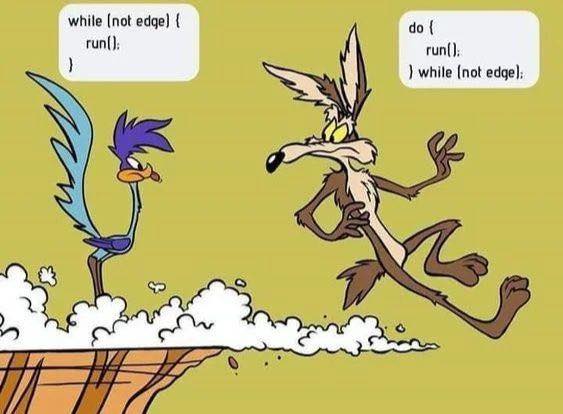
- This Road Runner cartoon shows two versions of the while loop.
- Explain how a while loop is related to a traditional
for loop.
Answer: The traditional for loop header has three parts: initialization, condition,
and iteration. Here are three examples:
// Display the numbers from 1 to 20:
for(var n = 1; n <= 20; i++) {
    document.writeln(n + " ");
}
// Output: 1 2 3 4 5 6 7 8 9 10 11 12 13 14 15 16 17 18 19
// Corresponding while loop, which still has the iteration,
// condition, and iteration statements, but not as conveniently
// displayed on the same line:
var n = 1;
while(n <= 20) {
    document.writeln(n + " ");
    n++;
}

// Display the odd numbers less than 20:
for(var n = 1; n < 20; i += 2) {
    document.writeln(n + " ");
}
// Output: 1 3 5 7 9 11 13 15 17 19
// Corresponding while loop:
var n = 1;
while(n <= 20) {
    document.writeln(n + " ");
    n += 2;
}

// Start with 1 and keep doubling
// the number while the number is
// less than 100.
for(var n = 1; n < 100; i *= 2) {
    document.writeln(n + " ");
}
// Output: 1 2 4 8 16 32 64
// Corresponding while loop:
var n = 1;
while(n <= 20) {
    document.writeln(n + " ");
    n *= 2;
}
- You are familiar with the comparison operator ==,
used in JavaScript, Python, Java, and C#.
- This operator acts somewhat differently in each language.
- The JavaScript == operator is liberal in its comparisons.
- x == y returns true if x equals
y after conversion to the same datatype.
- For example,
5 == 5, "5" == "5", 5 == "5", 0 == false, 1 == true
all return true.
- The === operator is strict in its comparisons.
- x === y returns true if the values
x and
y are equal and also are of the same datatype.
- For example 5 === "5", 0 === false, and
1 === true all return false
because, in each case, the operands are not of the same datatype.
- Predict the output of these statements:
document.writeln(`${5 == 5} ${5 == 3} ${"5" == "5"}<br>`);
// The string "5" is converted to a number before
// performing the comparison:
document.writeln(`${5 == "5"}`);
// Output:
true false true
true
- When performing a comparison, to convert a number to boolean (true or
false), the rule is that
zero converts to false, one converts to
true; any other value does not convert to
boolean.
Predict the output of this statement:
document.writeln(`${0 == false} ${5 == true} ${0.00000001 == false}`);
// Output:
true false false
- When performing a comparison, to convert a string to boolean,
the rule is that the strings
"", "0", and
"0.0"
convert to false, "1" and
"1.0"
convert to true. Any other string does not convert to
boolean.
Predict the output of these statements:
document.writeln(`${"1" == true} ${"" == false}<br>`);
document.writeln(`${"0" == false} ${"1" == true} ${"5" == true}<br>`);
document.writeln(`${"0.00" == false} ${"1.00" == true} ${"5.00" == true}`);
// Output:
true true false
true true false
true true false
- The === comparison operator only returns
true if the datatypes of the operands are the same
without converting.
Predict the output of these statements:
document.writeln(`${5 === "5"}<br>`);
document.writeln(`${"" === false} ${"1" === true}<br>`);
document.writeln(`${"0" === false} ${"1" === true}<br>`);
document.writeln(`${"0.00" === false} ${"1.00" === true}`);
// Output
false
false false
false false
false false
- Practice Problem: Predict the output:
var n = 1.0 - 0.8;
var m = 0.3 - 0.1;
document.writeln((n == m) + " ");
// Output:
false
Why? Because of differing roundoff errors
due to the binary representation of the double precision floating point numbers,
1.0 - 0.8 and
0.3 - 0.1 are not represented with exactly
the same values. To see this, look at the output of this statement:
document.writeln(n - m);
// Output:
-2.7755575615628914e-17
Instead of checking for equality with floating point values, we should check
that n and
m are very
close to each other:
document.writeln((Math.abs(n - m) < 1.0e-15) + " ");
// Output:
true
- An array is a list of values accessed by index. What
is the output?
var a = [2, 3, 5, 7, 11, 13];
document.writeln(a + "<br>");
document.writeln(a[4]);
// Output:
2,3,5,7,11,13
11
- Without arrays, multiple variables would be needed to hold a list of data
values:
a0 = 2;
a1 = 3;
a2 = 5;
a3 = 7;
a4 = 11;
a5 = 13;
- Also, the index of an array can be a variable, which
facilitates processing array items in a loop. For example:
for(var i = 0; i < 5; i++) {
    document.write(a[i] + " ");
}
// Output:
2 3 5 7 11 13
or
for(var n of a)) {
    document.write(n + " ");
}
// Output:
2 3 5 7 11 13
- An array can contain mixed types:
var a = [45.3, 'apple', false, null];
- What is the output of these statements (surprise)?
var a = [2, 3, 5, 7];
document.writeln(typeof a);
// Output:
object
// Reason: an array is not a primitive datatype, it
// is a composite datatype called an object type.