To Notes

IT 223 -- Feb 2, 2026

Review Exercises

  1. What is the total proportion (or percentage) of observations under a normal density?
    Answer: under any density including a normal one, the total area is 1, which represents the proportion 1.0 or percentage 100% of the observations.
  2. Show that a normal density with a smaller spread (σ) has a taller peak so that the area under the density is always 1.  To see this, plot normal densities with center = 0 and spread equal to 1, 0.5, and 0.2. Answer:
    x <- seq(-4, 4, 0.005)
    y1 <- dnorm(x, mean=0, sd=1)
    plot(x, y1, type="l", ylim=c(0, 1), xlab="", ylab="", 
        main="Normal Density with Mean=0, SD=1")
    y2 <- dnorm(x, mean=0, sd=0.5)
    plot(x, y2, type="l", ylim=c(0, 1), xlab="", ylab="", 
        main="Normal Density with Mean=0, SD=0.5")
    y3 <- dnorm(x, mean=0, sd=0.2)
    plot(x, y3, type="l", ylim=c(0, 1), xlab="", ylab="", 
        main="Normal Density with Mean=0, SD=0.2")
    # Replace the previous plot with the following to view the
    # entire density:
    plot(x, y3, type="l", ylim=c(0, 2), xlab="", ylab="", 
        main="Normal Density with Mean=0, SD=0.2")
    
  3. Show that a uniform density with a smaller spread (min - max) has a larger height to ensure that the total proportion (or percentage) of the observations in the interval [min, max] is always 1. Plot uniform densities with min = 0 and max = 2, 1, and 0.5. Answer:
    x <- seq(-1, 3, 0.005)
    y1 <- dunif(x, min=0, max=2)
    plot(x, y1, type="l", ylim=c(0, 2), xlab="", ylab="",
        main="Uniform Density with Min=0, Max=2")
    y2 <- dunif(x, min=0, max=1)
    plot(x, y2, type="l", ylim=c(0, 2), xlab="", ylab="",
        main="Uniform Density with Min=0, Max=1")
    y3 <- dunif(x, min=0, max=0.5)
    plot(x, y3, type="l", ylim=c(0, 2), xlab="", ylab="",
        main="Uniform Density with Min=0, Max=0.5")
    
  4. Draw normal plots that illustrate datasets with these characteristics: (a) approximately normal, (b) skewed to the right, (c) skewed to the left, (d) thin tails, (e) fat tails.
    Answer: look at the plots in the Normal Plots document, Nonnormality Section.

Look at the Bivariate Datasets document to help you with review exercises 5, 6, and 7.

  1. What is a bivariate dataset?
    Answer: a bivariate dataset is a dataset that contains two variables.
  2. What is a bivariate normal dataset? Give a parsimonious description of a bivariate normal dataset.
    Answer: a bivariate normal dataset is a bivariate dataset that is normal in every direction. In particular, if x and y are the two variables in the dataset, then both x and y are normally distributed. A parsimonious description of a bivariate normal dataset requires five statistics: X, SD+x, Y, SD+y, and the correlation r between x and y.
  3. Look at the Bears 2026 Roster: bears-2026-roster.txt. Use R to plot the weight in kilos vs. the height in meters for each player. The conversion rates are 0.3048 meters per foot and 0.4536 kilos per pound. Answer:
    setwd("c:/workspace")
    getwd( )
    [1] "c:/workspace"
    # Create a dataframe df to hold the 2026 Bears Roster
    # First download the bears-2026-roster into 
    # the c:/workspace directory (folder).
    df <- read.csv("bears-2026-roster.txt")
    # Create data vector of players heights in meters:
    h <- (df$HtFt + df$HtIn / 12) * 0.3048
    # Create data vector of players weights in kilos:
    w <- df$Weight * 0.4536
    plot(h, w, xlab="Player Height (Meters)", 
        ylab="Player Weight (Kilos),
        main="Height and Weight of 2026 Bears Roster")
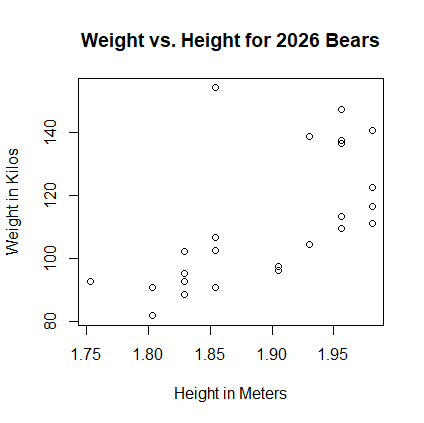
    

    Scatterplot Bears 2026 Roster

Correlation

Linear Regression

Project 3